Customizing your CRM data model
Last updated: August 3, 2026
Lightfield automatically builds your CRM by turning every email, meeting, and note into structured records.
You can customize this data model to fit how your team sells — adding new fields, editing existing ones, and defining how AI keeps them up to date.
This guide will help you:
Add and edit custom fields for accounts, contacts, and opportunities
Use AI-filled fields to automatically capture key information
Adjust your opportunity stages to match your sales motion
Core CRM records in Lightfield
Lightfield organizes your customer data into three main record types:
Accounts: the companies or organizations you interact with
Contacts: the individual people at those companies
Opportunities: records of potential or actual deals with a customer, including those in progress, won, lost, or churned. Opportunities track the full lifecycle of your customer relationships and help you understand how your pipeline evolves over time.
When Selective or Always is enabled under Account & contact creation, accounts and contacts are generated automatically based on your connected email and calendar activity.
Opportunities can be created manually, via Chat, or automatically through an automation. See Automations for setup instructions. Lightfield also suggests stage changes when detecting buying signals.
Accounts and contacts form the foundation of your CRM and Lightfield keeps them continuously up to date. Opportunities build on that foundation to capture the full history and outcomes of your customer relationships.
If your business tracks something these three don't cover — properties, funds, campaigns, contracts — you can create a custom object for it. See Custom objects and Relationships in custom objects.
Customize your fields
Go to Settings → Data model to view and edit your CRM structure.
Here, you’ll see the core CRM record types: Accounts, Contacts, and Opportunities.
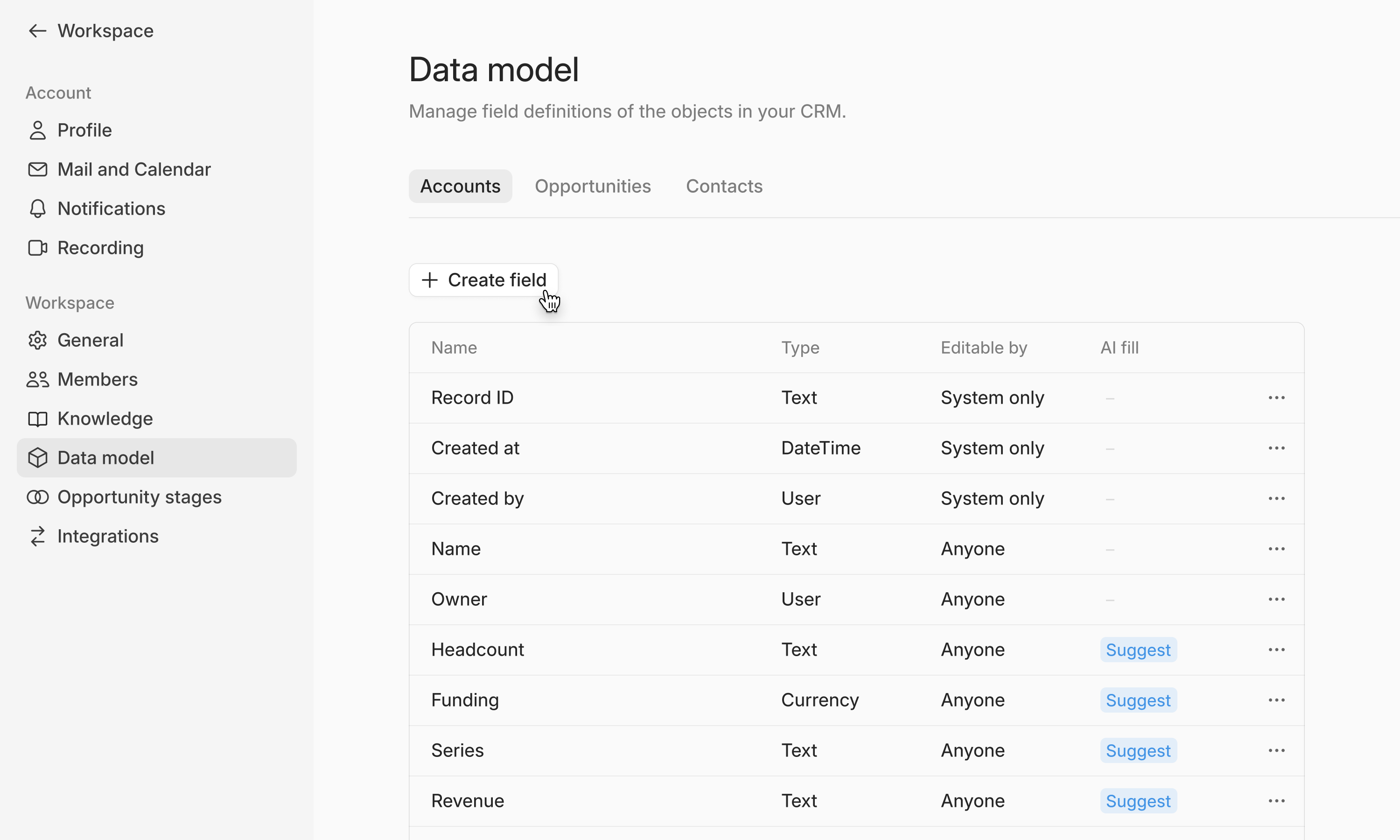
You can:
Add new fields for information that matters to your business (e.g., ARR, ICP tier, funding stage, tech stack)
Edit or archive existing fields that don’t fit your workflow
Enable AI-filled fields to let Lightfield keep data up to date automatically (see below)
Your CRM structure updates instantly for everyone in the workspace, ensuring a consistent view of customer data across the team. Only workspace Admins can modify the data model.
Choose the right field type
A field's type cannot be changed after the field is created. If you need a different type, archive the field and create a new one.
Because of that, it's worth naming the type explicitly when you create a field — particularly if you're creating it through Chat, which won't always pick the type you'd expect:
Add a currency field on opportunities called Contract Value.
Add a number field on accounts called Headcount.
Add a date field on opportunities called Contract Start.
Use Number or Currency for anything you want to sort, total, or chart. Use Date for dates. Reserve Text for genuinely free-form values. A number stored in a Text field won't sort correctly and displays as a generic icon rather than its value in board views.
There is no "team member" or "user" field type. The built-in Owner is the only user reference. To associate several people with an account, use a custom object with a relationship.
Reorder fields and control what's visible
Once your fields exist, you can reorder them and set which appear in the sidebar and on cards. Go to Settings → Data model, choose a record type, and open Display. See Manage object display settings.
Use AI-filled fields
For any field, you can choose to let Lightfield automatically capture relevant information from your emails and meetings. Toggle AI Fill on, add a short description or prompt (e.g., “What CRM is this company currently using?”), and Lightfield will begin identifying and suggesting updates for that field.
AI-filled fields can:
Surface suggested updates based on new context from emails or meetings
Help you keep CRM data fresh by reviewing and accepting updates directly in Lightfield
Be refined anytime if your tracking priorities change
This allows you to evolve your CRM as your business evolves. No rigid schema or re-implementation required.
Lightfield keeps a human in the loop. You decide which updates to apply, ensuring your CRM stays accurate and trustworthy.
While Lightfield doesn’t automatically backfill data, you can ask the agent in chat to update your CRM retrospectively based on past meetings and emails.
Off, suggest, or auto
Every field sits in one of three states. This is the setting that most determines whether your team trusts the CRM.
State | What it does | Use it for |
|---|---|---|
Off | Lightfield never touches the field | Anything with a source of truth outside Lightfield — contract value, billing entity, account tier |
Suggest | Lightfield proposes a value and you accept or reject it | Every new field. Start here. |
Auto | Lightfield fills and updates the field on its own | Fields you've watched on suggest for a couple of weeks and trust |
Start new fields on suggest. You get to see the quality of the inference before it touches your data, and every suggestion you reject tells you the prompt needs tightening. Moving straight to auto on a loosely worded prompt fills your CRM with confident wrong answers, which is harder to spot than an empty field.
Move a field to auto when three things are true: it has been right consistently for at least two weeks, a wrong value would be obvious to whoever is looking at the record, and your own team would agree on what belongs in the field.
Opportunity stage is the usual exception. Most teams put it on auto in their first week. Lightfield detects stage movement from what customers actually say, the value is visible to everyone who opens the deal, and correcting it takes one click.
Writing a prompt that works
The quality of the prompt is most of the quality of the field.
Ask a question rather than naming a topic. "What CRM and sales tools does this company currently use?" works. "Tech stack" does not.
Say what a good answer looks like. "Has budget been approved for this purchase? Answer approved, in progress, or unknown."
Say what to exclude. "Which competing vendors has this customer mentioned evaluating? Exclude tools they use for unrelated purposes."
Let it say it doesn't know. Adding "answer unknown if this hasn't come up" is the single most useful phrase you can include, and it's what keeps a field trustworthy.
Match the prompt to the field type. A single-select prompt should name the options. A number prompt should say the unit.
Customize your opportunity stages
Lightfield includes a default set of stages, but you can edit them to match your team’s sales process.
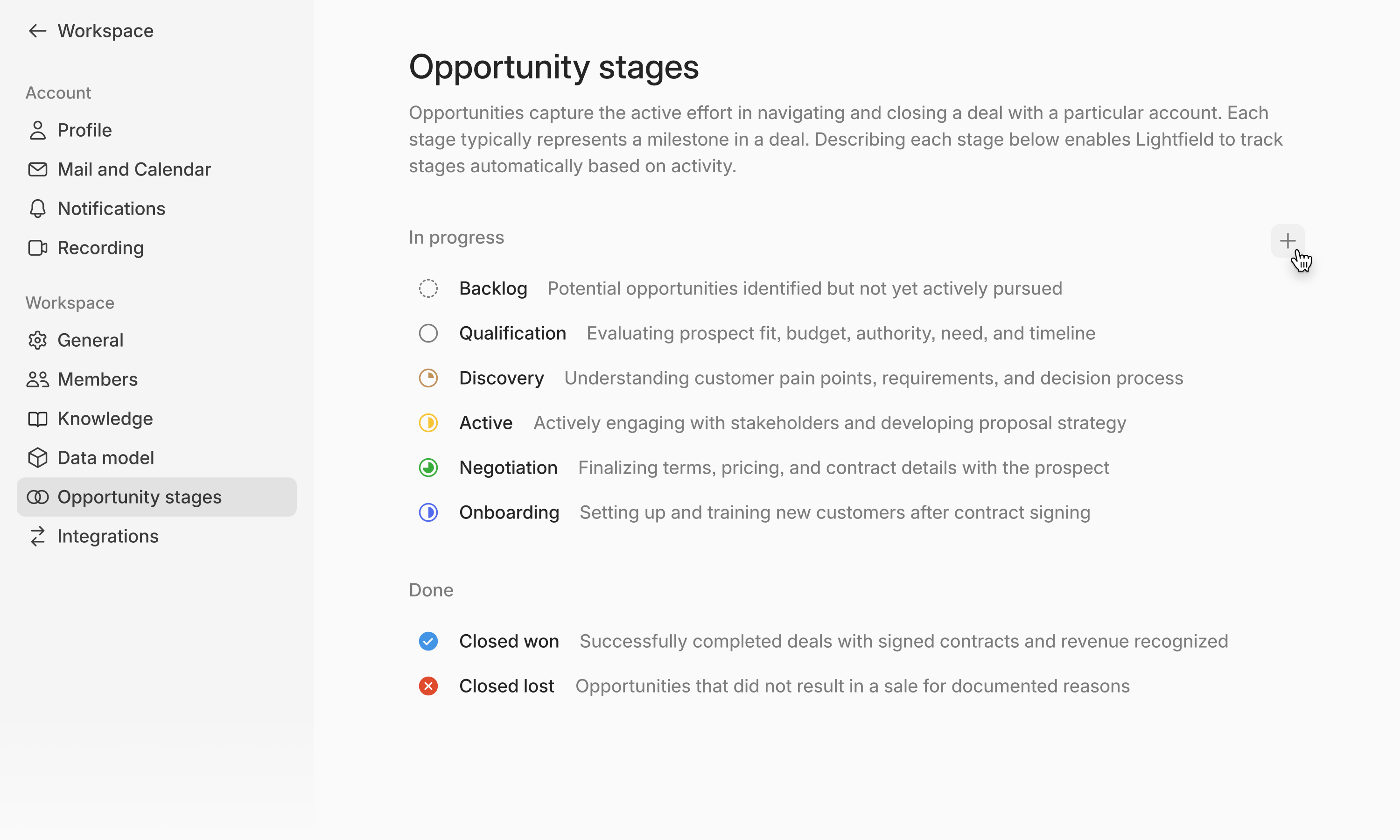
Go to Settings → Opportunities to review and adjust them.
Review the existing stages
Add or rename stages to fit your motion
Assign colors or icons for quick visibility
Keep the list short. Five or six stages that each mean something specific work better than ten that people guess between. Every stage should have a clear answer to "what had to happen for a deal to get here."
Lightfield uses your defined stages to interpret deal progress — suggesting updates automatically when customers indicate movement (e.g., “We’re ready for a trial”).
Common Questions
Who can edit the data model?
Only workspace Admins can create, edit, or delete fields and stages. Changes apply instantly for all users.
What happens if I archive a field?
Archiving a field removes it from active record views but keeps all associated historical data. You can restore it anytime by unarchiving the field in Settings → Data model.
Do data model changes affect existing records?
Yes, updates to your data model automatically reflect across all existing records for a consistent structure.
I picked the wrong field type. Can I change it?
No. Archive the field and create a new one with the correct type. It's worth reviewing your field types early, before they've accumulated much data.
A field shows as an icon instead of its value in board view.
This usually means a number is stored in a Text field. Archive it and recreate it as Number or Currency.
How many custom fields should I start with?