Understanding how Lightfield captures data
Last updated: June 6, 2026
Lightfield automatically builds your CRM from your email, calendar, and meetings, so your customer memory is always up to date without manual entry.
This guide will help you:
Understand what data Lightfield captures and how it’s structured
Learn how Lightfield keeps your CRM accurate and privacy-safe
Control what’s shared and how new records are created
How Lightfield captures information
When you connect your mail and calendar, Lightfield continuously syncs information to assemble your CRM.
It captures data from:
Emails: messages sent and received through your connected inboxes. Lightfield automatically filters out auto‑responders (such as out‑of‑office messages) and subscription emails based on email headers to keep your CRM focused on meaningful interactions.
Meetings: calendar events, participants, recordings, and summaries from the Lightfield notetaker
Notes: manually added notes or meeting recaps
Each new piece of information is automatically linked to the right Account, Contact, or Opportunity, so you never need to tag or log anything manually.
Lightfield connects the dots across your communication channels to create a complete, living record of every customer interaction.
What Lightfield creates automatically
When Selective or Always is enabled under Account & contact creation, Lightfield automatically generates:
When Selective is enabled, Lightfield only logs emails and creates records for interactions you've responded to. This helps prevent your CRM from being filled with spam, marketing emails, and other unreplied messages. If you want all emails logged regardless of response status, use the Always setting instead. Note that regardless of your setting, Lightfield automatically filters out auto‑responders (such as out‑of‑office messages) and subscription emails based on email headers to keep your CRM focused on meaningful interactions.
Accounts: new company records based on external domains found in your connected emails and meetings
Contacts: individual people associated with those companies
Meetings: external events, participants, and AI-generated summaries
Opportunities are not created automatically by default. You can create them manually, through chat, or automatically by setting up a Workflow (see "How to Auto-Create Opportunities with Workflows"). Lightfield will also suggest new opportunities or stage changes when it detects a potential deal or change in customer intent.
By default, Lightfield only creates records for external business domains. You can include personal domains (like @gmail.com or @outlook.com) by enabling Create contacts from personal email addresses in Settings → Mail and Calendar.
How Lightfield keeps your CRM up to date
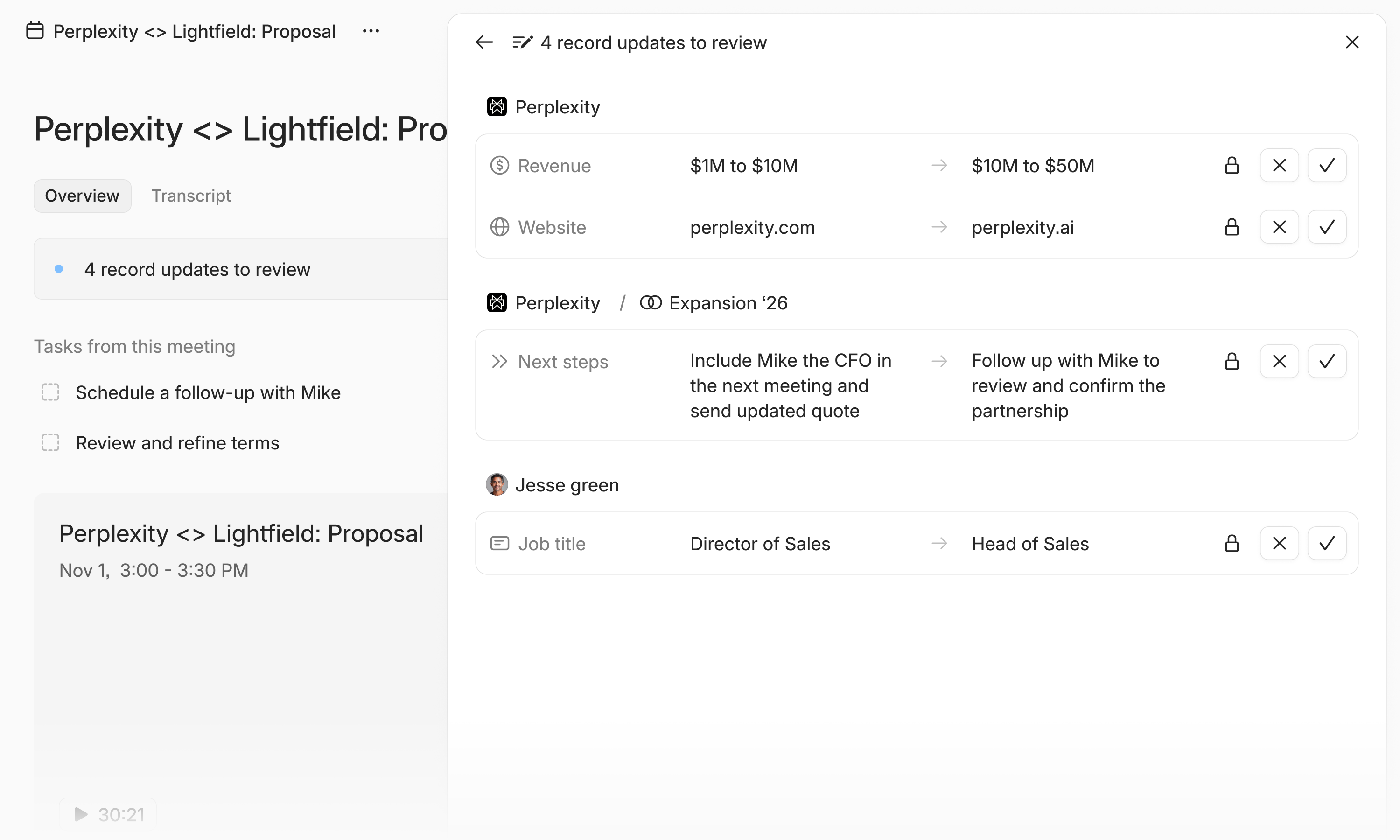
Lightfield continuously listens for new activity - emails, meetings, and notes - and surfaces Suggested record updates when it detects new or changed information.
Examples include:
Updating an AI-filled field like a company’s tech stack or current CRM vendor when new information appears in emails or meetings
Suggesting a stage change in an opportunity when a customer mentions progress such as “ready for trial” or “moving to contract”
You can review these suggestions and choose to Apply or Dismiss them directly in Lightfield.
This human-in-the-loop approach gives you full control and confidence in your CRM data - Lightfield surfaces what’s new, but you decide what gets applied.
Privacy, visibility, and control
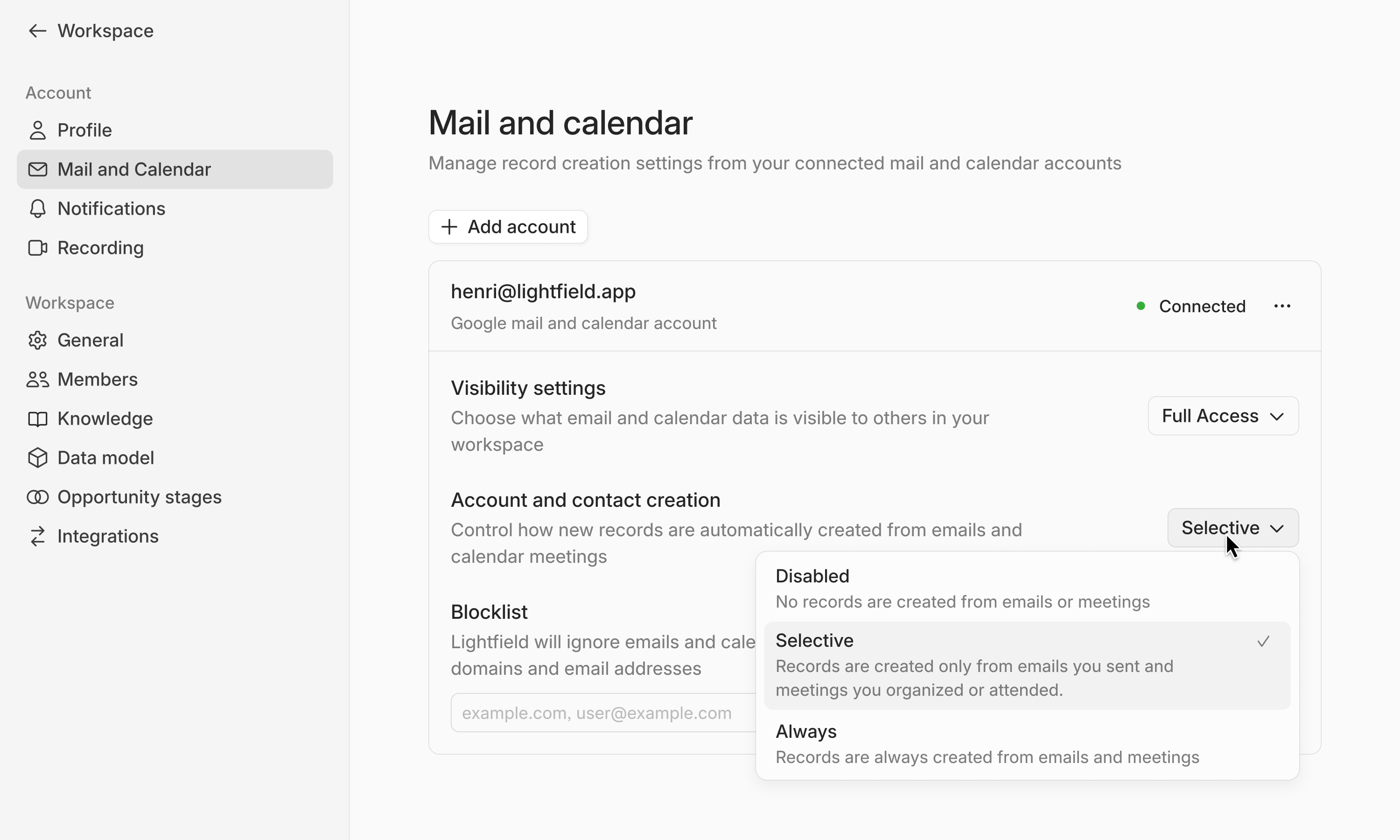
You decide what Lightfield captures and who can see it.
Visibility settings: choose between Full access (meeting summaries, email content) or Metadata only (participants and timestamps)
Record creation: select between Disabled, Selective, or Always for each connected account
Do not track: exclude specific domains or addresses from syncing
You can adjust these settings anytime under Settings → Mail and Calendar
Common Questions
How often does Lightfield sync?
Lightfield syncs continuously. Most new emails and meetings appear within minutes.
What’s the difference between record updates and enrichment?
Record updates come from your own interactions and Lightfield surfaces them as suggestions for you to review and approve. Enrichment adds public information (e.g., industry, headcount, or funding) automatically and doesn’t require approval.
Can I stop syncing a specific domain or contact?
Yes. Add them to your Do not track list in Settings → Mail and Calendar, or delete the corresponding record in your CRM. Lightfield will stop syncing the associated account or contact going forward.
Does Lightfield automatically apply record updates?
No. All updates are surfaced as suggestions first. You review and approve them to maintain data accuracy.
What happens if I disconnect my account?
Lightfield stops syncing new data immediately. Previously captured records remain available until you delete them.
Why don't I see certain emails in Lightfield?
If your mail settings are set to Selective, Lightfield only logs emails you've responded to. This prevents spam and marketing emails from cluttering your CRM. To see all emails, change your setting to Always in Settings → Mail and Calendar. Additionally, Lightfield automatically filters out auto‑responders (such as out‑of‑office messages) and subscription emails regardless of your setting, as these are typically non‑meaningful interactions.